


Category — Blogiquette or On Blogging
Is Your Blog Holding You Back?
There is a post that keeps coming up in the blogosphere in various incarnations that essentially states that the person is shutting down their blog (and sometimes starting up a new one) because their blog no longer fits them. Perhaps you have written one of these posts either in your head or in published form. People do this daily; close one space and begin a new one, either importing their old posts or starting tabula rasa. And sometimes they don’t begin a new space at all; they either say goodbye or don’t say goodbye and stop blogging altogether. Sometimes they feel as if they’ve outgrown their blog and no longer need it, or the space itself holds too many memories they’d rather not confront on a daily basis. And other times, they’d very much like to keep writing in the same space, but they feel as if they don’t know who their audience is anymore because their old readership no longer fits their current situation. Or maybe they know exactly who their audience is and don’t want to write what is on their mind for fear of offending them.
And when any of those things happen, a space that had once began as a refuge becomes a place of discomfort; what once brought clarity now brings mostly confusion; and what one was an anchor instead becomes a straightjacket.
Welcome to the drawback of niche blogging.
Niche Blogging vs. General Diarying
If you listen to blog experts who write on blogging expert sites, they will tell you that if you want to find an audience for your blog, you should engage in niche blogging, which means essentially that you write about one topic the majority of the time. Communities spring up around common topics, and the best way to find readers for your blog is to find other people who write about the same things and comment on their blog. Then they will find out about your blog and most likely want to read it because you are both interested in the same topic. See — genius idea. I, for example, could be labeled as an infertility blogger.
General diarists have an uphill battle in finding an audience because they write about themselves and until they’re a known entity, many people won’t find it enticing to click over and discover a new blog. Mostly because they have no clue what it’s about. General diarists get to write though about a whole slew of topics — anything that crosses their brain is fair game. I, for example, could be labeled as a general diarist.
Wait, how could I be both a niche blogger and a general diarist at the same time? I mean, it fits right? I wrote about swearing yesterday and family trees the day before that. And once or twice a week, I write about infertility. So I’m definitely a niche blogger and a general diarist at the same time.
And why the hell not?
No, I mean seriously, who is the blogging empress who decreed that you need to be one or the other? I give you full permission to start thinking of yourself as both at the same time, and writing accordingly.
Who Wears the Pants on Your Blog?
Some people are fully in control of their content. They write what they want to write and don’t care if anyone reads it. More people share control of their content. They write what they want to write, but they also take their readers’ feelings into consideration (some more than others). And then there are people who give control of their blog over to their blog. Yes, this inanimate space dictates what they publish. More on that idea below.
You: do you write whatever you feel like writing without anything holding you back? If you feel like writing 15 posts in one week about peesticks, do you write 15 posts about peesticks, even if you get a comment on the 12th one saying, “really? Another post about peesticks?” Do you keep your blog solely as a record for yourself, and while readers are nice, they’re not necessary for you to keep being invested in writing?
Your Readers: these are the people you know and the people you don’t know. While I only know a fraction of the people who read my blog, I can guess my general readership and know what they would and would not want to read. You probably know your readership too. Do you give your readership a lot of thought when posting something? How much thought? Would you post something if you knew it would be unpopular or upset people? Do you worry about alienating or losing readers? Would you stop writing in your current space if there was no one there to read it?
Your Blog: your blog has a personality. It would be totally out of character for me to begin posting daily recipes or haikus. You’re just not going to hear posts about potty training here (by which I mean that I didn’t write those types of posts back when we were going through potty training). So sometimes it’s not the readers who are limiting you, but it’s the blog itself which is holding you back. Maybe you don’t want to publish recipes anymore, but that’s sort of your “thing” so you now feel like you need to continue it. Or maybe you don’t want to write about infertility anymore, but you think that since your blog is called My Big Fat Hairy Uterus, you need to keep posting about said internal organs.
This is a question where I think everyone will have a different answer: in terms of percentages, who determines the direction of your content — you, your readers, or your blog?
As a personal blogger, if you are not writing what you want to write — what you need to write — is your blog serving you? Are you getting enough out of the time investment that comes with writing?
Are you happy with the breakdown of your percentages for what you’re allowing to determine the direction of your content? And if you’re not happy, are you going to do something about it?
Do You Really Have to Move?
You’ve probably noticed that I don’t have a great love for closing up shop on one blog and opening up a new one; at least, not for myself. I continue to live in the same house regardless of how life has changed and our family has grown. Perhaps one day we will move if this house no longer serves us, but for the time being, we’ve made the house change to fit our needs rather than moving ourselves as circumstances change. And I feel the same way about my blogging space; I’ve tweaked it to fit different stages of my life that I’ve gone through in the last six years instead of closing a blog and starting a new one as circumstances change.
I don’t mind when other people do this, though it’s just as pain-in-the-assy as captcha or music autoloaders. When a person changes their blog url, I have to decide whether to delete the old space or keep it in my Reader for old time sake. I have to update feeds, remember a new name. Sometimes I’m successful with moving with the person, other times, I lose them in the shuffle.
So perhaps this post is also self-serving; by encouraging you to stay put, I don’t have to update things on my end.
But I really do hate to see people struggling with that decision to leave behind a space they’ve always loved. To see people wondering where they fit in after a life change. You fit in exactly where you’ve always fit in — you fit in that YOU space that’s created by… you. Wherever you are is where you need to be, and the rest of us will follow you if you lead us. Please know that you are in charge of your blog.
Last Thoughts
If you’re interested in hearing more on this topic, I’m moderating a panel at BlogHer next week for three other members of the ALI community (Kathy, Lori, and Kir) called “My Blog No Longer Fits Me.” Even if you are not at the conference, you will be able to follow along from home because there will be someone there liveblogging (and I believe taping, at least, audio if not video). And you can participate too by leaving a comment below telling me in terms of percentages, who determines the direction of your content — you, your readers, or your blog? Though please also write your blog name in the body of the comment so I can make sure I mention that if I read it aloud.
July 25, 2012 33 Comments
The Blog is Dead; Long Live the Blog
Every few months, someone will write the obituary of the blog. I don’t mean their blog. I mean blogging in general. Blogging’s death is practically cat-like; it has died at least nine times since I started blogging in 2006.
I get why entertainment magazines keep half-written obits on celebrities so they can get them up quickly when the time comes, but entertainment magazines don’t post those obits when the celebrity is still alive and kicking. Can you imagine opening up a newspaper and seeing a long, thought-provoking obituary talking about your death as well as all the high points of your life that you read while you sip a cup of morning coffee? Post the blogging obituary when the last blogging body is in the morgue, not while our fingers are still typing.
According to WordPress.com, as of last year, 100,000 new blogs were started daily. While there will naturally be attrition of individual blogs, blogging as a whole is clearly still a popular medium.
With the blogging obituary, we usually get the cause of death too; prematurely, I might add since blogs aren’t dead. Sometimes the cause of death is other forms of social media such as Twitter or Facebook. Other times, pictures murder words and leave its decomposing corpse in the feed reader. And other reasons are given as well: they’re too long to read, too much work to produce, too slow to process. Blogs, for instance, according to USAToday, are slogs. Take a knife to the blog’s proverbial throat.
You may have guessed that I don’t believe blogging is dead; or, more accurately, I just don’t care.

As I said last week on my sixth blogoversary, I’ve been writing a personal blog for six years. Which means that I’ve not only been there for the birth of most of these social media sites that are murdering blogging, but I’ve seen bloggers come and go, memes circle round and round, and blog projects go viral and die. I feel a little bit like a cow, chewing her cud, only the cud is composed of blog posts. I’m just hanging out, watching the field change as people bounce across it, but the point is that even if the field changes, the world still needs cows.
We need milk, meat, or leather (and in this blogging analogy, words or ideas) and we usually need them in quantities larger than 140 characters. It’s a big field and there is room for the slow-moving blogosphere cows and the nimble rabbits bouncing around Twitter and the prancing horses boasting about their family on Facebook, in the same way that magazines, newspapers, and books all deliver the written world and exist together at the exact same time. And come to think of it, those three items are still kicking around too despite their demise predicted dozens of times in the last few years, mostly by people who would benefit from the downfall of the traditional publishing world.
Listen, no one maintains the same level of health and robustness their entire life, but that doesn’t mean that they aren’t still living, still well enough to be part of society. Let’s not put grandma on ice flow, right? Are blogs as shiny and fat as they were in their prime? No, but that doesn’t mean the blog’s new, mature body and mind isn’t just as valid, just as interesting.
Plus, these obituaries are written based on assumptions. That USA Today article is looking at a study on company blogs and transfers those findings to personal blogs. Whereas sites such as Technorati and BlogHer has been conducting the same surveys on social media usage for years in order to get a real sense of social media trends. Technorati posts their State of the Blogosphere yearly, and BlogHer’s findings from over 2000 participants found 98% of BlogHer women (and 81% of the general US population) trust information from blogs over information from Facebook or Twitter. As their survey found:
Blog readers prefer blogs for information. Facebook is our source for play and friendship.
So, fine, predict the death of blogs all you want, but I’m still going to be over here writing mine. Blogging, for me, is still an active, vibrant medium that challenges me to think, introduces me to new ideas, and strengthens my understanding of other people. And I just can’t get that from a Twitter feed or Facebook status. It’s not just the amount of space allotted to pass along ideas; it’s also the format of popular social media sites that doesn’t give people time to ruminate on the big thoughts that are contained in the words. And blogging does. I can chew over blogs… until the cows come home.
Do you think there will ever be a day when you won’t write or read blogs if the technology to support them is still around?
Cross-posted with BlogHer.
Photo Credit: Srboisvert via Flickr
July 2, 2012 18 Comments
The Unshy Introvert, or Blogging is Interaction Once Removed
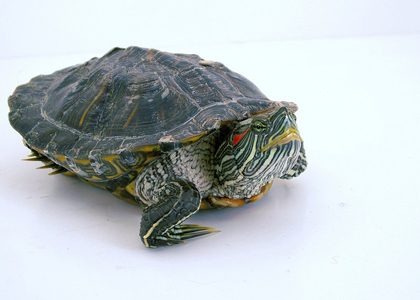
Ann and I have been having an interesting conversation (hi, Ann!) about introversion vs. extroversion and shyness vs. boldness. I am definitely an introvert, but I’m not shy. Back when I taught at university, I had no problem getting up in front of 400 students and lecturing. I also have no problem doing a panel at BlogHer. I may prefer to have Josh speak for me sometimes (ordering food comes to mind…) but if we look at the definition of shyness, I don’t really fit it. I’m not very inhibited, and I only feel social discomfort when it seems like I’m not connecting with others. If I’m at a social event and I have friends there, I don’t feel that anxious.
Whereas I’m definitely introverted, and I see it as how deeply I let people in who haven’t already passed the gate to my inner circle (close friends, family, partner, twins). I’m not extroverted, drawing people close immediately. I turn inward more than I turn outward. I think we tend to think of all bloggers as extroverted because they’re putting their innermost thoughts out there, but there are two things about blogging that defy introversion or extroversion:
- Blogging is interaction once removed. We send out thoughts out there, but via an indirect system. There’s a big difference between speaking to anyone (any maybe no one) and speaking directly to a person. I think of blogging in the same way I think of Halloween costumes and how they sometimes change the way we interact with others, making us bolder because they remove us from our norm and place something between ourselves and the person we’re facing. Same with masquerade masks. I’m not Melissa anymore directly interacting with the person in front of me. I’m Melissa with a layer between myself and others, and that to me dissolves shyness and boldness, introversion and extroversion. We’re interacting with people, but we’re also holding them at a distance just based on the medium.
- It’s not blogging itself we need to look at to see introversion or extroversion, but how you respond to other people reaching out to you. To writing about you, for instance. Extroverts may enjoy having people write about them more than introverts because writing about someone enters their personal space. Some people enjoy having people enter their space, and others fear it. For me, the act of sending my words out there vs. having someone write about me invoke two very different sensations. I like the first one. I don’t really like the second.
So I can be an introvert and send my thoughts out there because I’m sort of like a turtle crawling back into her shell after my thoughts are released. I like the conversation because it helps me to define my own thoughts, and I’m also always interested in what other people think; especially if they disagree. I like to see the world from new angles, places I couldn’t have gotten to on my own. But I like just hanging out in my shell and listening until I’m ready to come out again.
I am consistently turtle-like all over my life: slow and steady wins the race definitely rings true (though my version may be more like, “it’s good to be slow and steady, but I don’t really care about the race”) and I don’t get drawn into changing myself to fit new trends. This should probably be fairly obvious by my clothing choices which have remained consistent and comfortable since 1992 (am I the only person who still wears overalls and stripey shirts?), but it also takes me a long time to see the point of taking on new technology or trying out a new site, and even then, I’ll only utilize them if it doesn’t mean a great deal of change. And I’m turtle-like in my interactions; peek out of shell, go back into shell.
But turtles aren’t shy. They don’t pull into their shell due to social anxiety. They pull into their shell because they like to cocoon until they determine whether something is safe. I don’t spend a lot of time around turtles, but I’d be willing to bet that they don’t pull themselves into their shells when they’re just chilling with their turtle significant other. Once I’ve determine that the person feels emotionally safe, I keep my head out of my shell.
But when people write about me, it’s as if they are reaching into my hard shell with their fingers and dragging my head out for others to see. It’s one thing for me to stick out my neck; it’s another to suddenly feel virtual fingers gripping me. Though I know there are people who never need to pull their neck into a shell; perhaps they’re more like a different animal, one who is a little more cuddly and cute. Sometimes I wish I were more cuddly and cute. But I comfort myself with accepting that I am a turtle by reminding myself that at least I’m not a crab. Or a bivalve. Or a millipede. People do keep turtles as pets, even if they aren’t the most exciting creatures to love.
And don’t even get me started on the third layer which is wanting attention or the lack of desire for attention since I also separate out my desire for attention on me vs. attention on my words/thoughts.
So I’m a non-shy introverted. What are you?
Photo Credit: LabyrinthX via Flickr.
June 6, 2012 24 Comments
Facebook Privacy Notice and Building a Dream Social Media Site
A friend sent me the text from a status update that is making its way around Facebook which is being referred to as the Facebook Privacy Notice:
PRIVACY NOTICE: Warning – any person and/or institution and/or Agent and/or Agency of any governmental structure including but not limited to the United States Federal Government also using or monitoring/using this website or any of its associated websites, you do NOT have my permission to utilize any of my profile information nor any of the content contained herein including, but not limited to my photos, and/or the comments made about my photos or any other “picture” art posted on my profile.
You are hereby notified that you are strictly prohibited from disclosing, copying, distributing, disseminating, or taking any other action against me with regard to this profile and the contents herein. The foregoing prohibitions also apply to your employee , agent , student or any personnel under your direction or control.
The contents of this profile are private and legally privileged and confidential information, and the violation of my personal privacy is punishable by law. UCC 1-103 1-308 ALL RIGHTS RESERVED WITHOUT PREJUDICE
Snopes, of course, debunked this immediately. You can’t post something on your Facebook status that negates the TOS of the site and have it be legally binding any more than you can change the wording in a paper contract, sign it, and have your wording supersede the contract’s wording without agreement for your wording from the contract’s creator. When you sign up for a Facebook account, you accept their terms of service, and nothing you can do (beyond bringing a lawsuit against Facebook) can alter that contract. Joining Facebook, in and of itself, means giving up a bit of your privacy. And Mark Zuckerberg isn’t allowing you to change the contract to fit your needs.
I’m not surprised that a status update has made the rounds on Facebook; but what I am surprised at is that no one is saying, “this is what we want, so let’s create it.” People obviously don’t trust Facebook if they’re posting this since it stems from a belief that there were untold privacy changes now that Facebook is a publicly-traded company. The notice also contains:
Facebook is now a publicly traded entity.
Unless you state otherwise, anyone can infringe on your right to privacy once you post to this site. It is recommended that you and other members post a similar notice as this, or you may copy and paste this version.
If you do not post such a statement once, then you are indirectly allowing public use of items such as your photos and the information contained in your status updates.
Privacy is obviously an important point for so many people, ranging from social media to the airports and TSA. And yet we also utilize these sites that compromise our privacy in a way that actually compromises our privacy. Meaning, if you don’t post something you want private on Facebook, you don’t have your privacy violated. But people do post things they’d like to have remain private on Facebook, which is this very possibly public forum.
Why isn’t someone stepping up and creating the dream site? Do we actually care about privacy or do we just like to grumble? (I’ll admit, I like to grumble.) How do we keep a social media social while putting a lot of restrictions in place, since we all know that private blogs are not as social as public blogs; don’t receive the same traffic, the same amount of comments. And how does one keep a site running and being a financially feasible entity without invading people’s privacy in the form of tracking for advertising or creating assets?
But moreover, what sort of TOS would that dream site have to have for you to leave Facebook and Twitter behind in order to join your friends in this new space? Would you be willing to give up your Facebook and Twitter accounts if someone created this fantasy TOS space, or would you continue to hold onto your old social media accounts, cross-posting the same material on all sites? That, to me, is the most interesting discussion of all.
June 5, 2012 11 Comments
How to Set-up a Self-Hosted Blog (and Move Content from Blogger, WordPress, or Other Sites)
 Photo Credit: Magnus D via Flickr.
I promised you a post on how to set-up a self-hosted blog and here it is. This post starts with the assumption that you’ve been using free software (Blogger, WordPress, or something similar) and blogging for a bit, and now you want to move to a self-hosted space. If you’re starting a new space entirely and not transferring posts and comments from an old space, simply skip step 8 but do the rest of the steps.
Why Self-Host
Ignore the people who are speaking in rapturous tones about how you’re going to be able to host sound files and video, as if the mere thought of these media forms sends them into orgasm. Ignore the people who tell you that self-hosted blogs look more “professional.” In this space, we’re doing this for one reason and one reason alone: ownership.
I think of self-hosting as somewhere between an insurance policy for my blog and a promise that I won’t need to end up sleeping on some other platform’s sofa because I’ve been evicted from my blog space. The difference between a self-hosted blog and a free blog is the same difference between an apartment you own and one that you squat in. When you own an apartment, you can decorate your space any way you want. You have room to hold all of your things — physical items in the house and sound files on the blog. And more than that, you own it. It’s yours. No one can take it away from you (provided you continue to pay for hosting and don’t violate the TOS of your host). When you squat in an apartment (we can’t even say you’re really renting because you have little to no recourse if your free blogging platform evicts you), you could end up living there blissfully for many years or you could end up coming home one day and finding the locks changed. With no super to let you back in.
So that’s the biggest reason to self-host.
Oh, and hosting a sound file is cool too (imagine When Harry Met Sally-like orgasm right here).
Step One: Pick the URL and Name
Choose a blog name and blog url. You will be able to change the name in the future, but not the url. So choose something general that applies to many facets of life since you’ll hopefully have this blog for a long period of time. By which I mean, don’t choose a url in the same way you chose a url for your free blog. This one needs to grow with you and shouldn’t be tied to a single facet of your life. Unless there will never be an end to that single facet of your life OR your blog is so established that changing the url now will be confusing. I have to admit, I went with stirrup-queens.com because I fell into that latter category.
Step Two: Pick a Host
There are dozens of reliable hosting sites out there. A while back, Lifehacker compiled their 5 favourite web hosting services. BlueHost, DreamHost, and HostGator are all commonly-used web hosting sites. Ask bloggers who self-host which company they’re using. Other questions to ask friends: Is the company reliable or do the servers go down a lot? Is it user-friendly? Can you get helpful people on the phone when you have a question? Like everything else out there (telephone companies, television service providers, doctors, etc), you will find some people who have the most amazing experience with their host and simultaneously people who have the worst experience with the very same host. What I’m saying is go with one of the big hosting companies because they’re consistent and keep in mind that they’re still a company and personal experience with the company (vs. delivery of goods) will likely vary.
When you purchase your hosting package, you will also be purchasing the url. If you already purchased the url via another place, you will need to let the host know that. You can transfer the url, but it takes time and usually a bit of money. You have three options: (1) transfer the url — your new host will be able to walk you through those steps, (2) continue to use the url and pay two different places — your domain will be a yearly charge from one place and your hosting will be a yearly charge from another place, or (3) get a new domain with your new host and redirect your old domain to point to the new domain. Once that old domain expires, you will either need to pay to renew it or hopefully have all of the traffic moved to your new domain anyway.
If you are getting your domain from your new host, you will also want to opt for domain privacy. It is an additional charge, but it is worth it. If you don’t opt for it, the address and telephone number you use to purchase the hosting will become part of the WHOIS database, searchable by anyone on the Internet. If you opt for domain privacy, your host will provide their address as the publicly listed address with your address privately listed on the account.
Step Three: Get to Know Your cPanel
Welcome to ownership. You now have two spaces on the Internet that you need to maintain (actually, three if you count your old blog). One of them will be your blog dashboard, which is the software you are familiar with if you have ever blogged. The other space is your control panel or cPanel on your host’s site. So, let’s say you chose BlueHost as your host (I’m going to use them as the example, but if you went with another host, substitute their name every time I write BlueHost and tweak the instructions accordingly). Go to the BlueHost site now and look at the top right corner of their site. You will see a login box called “Control Panel Login.” Um… and then what are you waiting for? Log in.
Step Four: Install WordPress
I know it’s confusing, but there is also a paid version of WordPress in addition to the free version of WordPress. You are going for the “installed version” which is the paid version. Scroll down to the Site Builder section of your cPanel and you will see a 1-click installation of WordPress option. You will now be utilizing a program called SimpleScripts, and it will walk you through the process of installing WordPress. By the way, I’m telling you to install WordPress not because it’s the only option out there but because it’s the easiest option out there. I’m assuming that if you have the ability to build a site from scratch with other software, you wouldn’t be reading a post called “How to Set-Up a Self-Hosted Blog.”
So click “install.” You will then be asked where you want to install WordPress. You will want to install it under the main domain if your site is strictly a blog (http://yoururl.com). The only reason you’d want to install it to a subfolder is if you are a business and you want your blog to be a small part of your site, but the rest of the site will be your business.
Answer the preferences questions and hit “complete.” It will now install the software and give you a link to the new login information for your site. Write all of this down (though they’ll also email a copy to you). And now go to your site by clicking on the link, put in the login information, and voila, you have your own completely empty self-hosted site.
Step Five: Pick a Theme
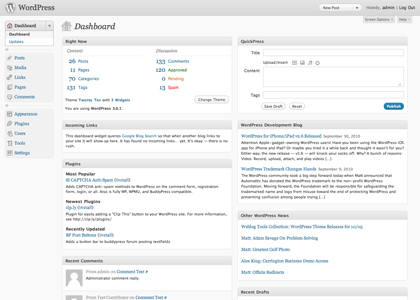
You are now in the dashboard of your site.
 By http://wordpress.org [GPL], via Wikimedia Commons

This is different from your cPanel (where you just were on the BlueHost site). This is where you are going to login everyday and write your blog posts. You will only be visiting your cPanel from time to time. You will be visiting your dashboard daily. So bookmark it.
The theme is the template of your site. There are hundreds of thousands of themes out there — some paid, some free. For the sake of ease, I’m going to recommend that you start with one that has already been approved by WordPress and listed in their theme directory rather than go out to a website (just Google “WordPress themes” and you’ll find them) and find one to install.
In your dashboard, go to the left sidebar menu and choose:
- Appearance, and then
- Themes, and then choose the tab marked
- Install Themes (as opposed to Manage Themes)
After you peruse the options (use the check boxes to search for one you might like), choose a theme and hit install. This is the template for your blog.
Step Six: Fill Out Information in Settings
You have your theme; now you need to set your blog options.
Go to Settings on your left dashboard menu. We’re going to open each option and fill out some information. Make sure you click “save changes” at the bottom of each screen.
- General: Give your blog name under “site title.” Give the url under “WordPress Address” and “Site Address” (http://yoururl.com). Enter an email address where you want to receive information such as sent comments. Don’t click that membership box. New users should be set to subscriber because you can always override that for individuals and make them more later. Set your timezone and your date format, time format, and starting day of the week.
- Writing: Set the size of your post box (this is what you see as you write a post. Feel free to make it big). The rest of this page is sort of up to you. You can choose whether you want to be able to post remotely — like from your email. You can also list your blog with Ping-o-Matic and then under “update services” put the following url (http://rpc.pingomatic.com/).
- Reading: You want your front page to display your current posts (unless you want a static page to always be your landing page — not really recommended unless there’s a good reason). Tell how many posts you want on the front page of your blog at a given time (and keep the number small because it will affect load time) or in your feed. This is where you set whether you want to publish the full text in your blog feed or the summary (this only affects how your blog appears in a Reader).
- Discussion: These settings can all be changed on individual posts, so this space just sets the default position. Opt for comments on all new posts, say what you want commenters to leave informationwise in order to leave a comment, say when you want comments emailed to you. A piece of advice: the spam filter is great on installed WordPress and most people don’t really need comments moderated. Make it as easy as possible for people to leave a comment on your site. You can also list your preferences for moving a comment automatically to moderation or spam. Feel free to play with the avatar settings.
- Media: Set your media size limits (pictures and videos) or just go with the default settings.
- Privacy: Set your privacy option depending on whether you want to show up in search engines.
- Permalinks: Set your permalink preference. My advice: choose one with a name because it will help people quickly identify the post vs. ones with just numbers that don’t give any information to the person looking at the url. If you are concerned about redirection (see below), you will need to use the custom permalink option in order utilize some of the redirection tricks. Read on before you decide on this one.
Go to the Users menu in the left dashboard sidebar and also create a new login for yourself while erasing the “admin” one if you haven’t already done that. Leaving the admin one up can become a security risk.
Step Seven: Plugins
Two terms you’re going to have to know to use WordPress are widgets and plugins.
Plugins allow you to do everything you could do on your free blog and then some. The thing is, your blog comes with only one or two plugins, so you will need to load the rest. This is a pain-in-the-ass if you wish all of it was delivered to you like a free blog, but it ultimately more rewarding and makes your blog exactly as you like it.
Your site should have come with Akismet installed. If not, make sure you choose that as one of your plugins. It’s a spam filter, and it’s amazing. Other plugins you may want are audio player (so you can host a sound file), flash video player (so you can host video), and something that maintains Blogger or WordPress or Tumbler permalinks (you’ll need this if you’re importing your blog from another place. Here’s an example plugin). If you go to the plugins menu on your left dashboard sidebar, you will see an option for “add new.” That is where you search for new plugins, and you can find them to do pretty much anything. From putting those “share on social media sites” buttons at the bottom of a post to polls that you can embed in your sidebar.
Widgets are little boxes that you can move around under “Appearance” to place things on your actual blog sidebar. So add a link list or a way for people to subscribe to your RSS feed or whatever else you want. The point: make your space a comfortable little home for your content. And don’t feel like it needs to be perfect from day one. Get the bare bones up, and you’ll add to it over time.
You may also want to tweak your template a bit — remove an item or change the spacing. You do all of this from the Appearance menu as well. Just go into the editor option and you’ll see a lot of code. Er… on second thought, it may be better not to fiddle with this section unless you know what you’re doing.
Please note that every theme is different, and your dashboard may look a bit different (or have different names) too.
Step Eight: Import Your Content
The larger the blog, the harder it is to move. Those are just the facts, ma’am. Moving a small blog with a few posts and comments is like moving a mouse. Pick it up and place it someplace else. Moving a large blog with hundreds of posts and thousands of comments is like moving an elephant. It can be done, but it isn’t going to be simple and you may want to invest in having someone else move your site, especially if you’re easily frustrated when you hit roadblocks. There are plenty of bloggers who moonlight doing Web design, and they can help you move over your blog and get it set up for a fee. Again, ask people who self-host for recommendations if they used someone to help them set up their site or it looks like WordPress offers their own version.
But wait, you want to do it yourself. Roll up your sleeves and let’s get started.
Option One
Go to your new WordPress site. Choose Tools, then Import. You will see an option for Blogger or WordPress (or other sites such as Tumbler, LiveJournal, or Typepad). Install the importer and authorize it to pull the content from your Blogger or old WordPress account. Click the “magic button” and you should see your posts and comments begin moving to your new site. You may need to hit “continue” a few times if the text on the button changes to say “continue.” You may also see it say something such as “set authors.” This means everything has been moved over.
Option Two
If for some reason that doesn’t work (and it might not if your blog is too big), here is another way to bring in your content. Go to your old site and go into the dashboard. In WordPress, go back to your the left sidebar and choose Tools, then Export. Download it and save it to your computer. In Blogger, go to Settings, then Other, and then you’ll see Blog Tools at the top of the page. Click Export Blog and save it to your computer.
Then, go into your new site and go to the dashboard again. Under Tools, you will also find Import. Upload the file and you should see your posts and comments in the new space (remember to choose download & import file attachments).
Redirection
Now you need to go back to your old space and redirect your old blog posts to point to your new blog posts. This is actually fairly complicated. WordPress has a paid service that will direct it for you (it costs $12 per year and may be worth your time and stress to do so) or you can try to do it yourself with their instructions. I found instructions online for how to do this from Blogger. Here is another online tutorial that Lifehacker recommended.
Or let the old site go — you only need to redirect if people have a lot of links to your blog on their blog, or if you get a lot of traffic from search engines.
Step Nine: Enjoy Your New Site
Be prepared if you do it yourself that it will take time. It took me weeks to move over all of my content and comments, design the site, and I had people helping me. It’s best to move your blog without a mental timeline in place, and to take a step back and deep breathe when you realize how much there is to learn.
Like owning a house, you will always find little things you want to fix and clean-up. But also, like owning a house, once you’re settled, you’re going to look up and smile at how far you’ve come. When we first moved into our house, I had no idea that there was a proper way to paint a wall, or how to fix chipped enamel on a tub. I had to learn and did so by asking a lot of questions. And the same goes for self-hosting a blog. No, I didn’t know HTML or how to read a line of code and figure out what to tweak. I just jumped in and got my hands dirty (and cried a lot in the beginning). People — like me — are usually happy to answer questions that come up along the way. I find that Twitter is often a lifesaver in getting a quick answer when you don’t understand something with self-hosting.
But more than the control I feel in what I can do with the blog, I also feel more settled about my space on the Web. I know where my blog is going to be parked.
Last piece of advice: back-up your blog. Do it often. Do a poor man’s blog backup and export a copy of your blog to save on your hard drive every few days. And now go fly — you are totally ready to do this.
Ask questions (or add additional advice) in the comment section below. For the sake of ease, I’m going to answer questions in the comment section instead of emailing the answer to you so everyone can see it. So return to see the answer later on.
May 30, 2012 15 Comments