

#Microblog Mondays 98: Haircut
 Not sure what #MicroblogMondays is? Read the inaugural post which explains the idea and how you can participate too.
*******
The ChickieNob and I hauled ourselves over to the hairdresser for our annual haircut.
Every time I go, she tries to sell me on the expensive shampoo they carry at the salon. I am thinking about getting a t-shirt printed that says, “I use shampoo from the drugstore, and you’ve already expressed your disgust at it during the last visit.” Though this time she said, “I remember that you think your grey hair is a pretty colour, so I am not going to tell you change that.”
Small victories.
She really does do a great job with the cut, hence why I keep going back to her. She also gets me in and out of the salon in under 15 minutes (including hair washing).
I dread haircuts because I don’t like strangers touching me. I find things like manicures or haircuts very stressful. I let her go a little shorter than I wanted just so I wouldn’t have to see her again for a long time.
Do you enjoy getting haircuts (or manicures or other pampering services) or do you also find them a dreaded item on your to-do list?
*******
Are you also doing #MicroblogMondays? Add your link below. The list will be open until Tuesday morning. Link to the post itself, not your blog URL. (Don’t know what that means? Please read the three rules on this post to understand the difference between a permalink to a post and a blog’s main URL.) Only personal blogs can be added to the list. I will remove any posts that are connected to businesses or are sponsored posts.
| 1. | No Baby Ruth | 11. | IF Pom | 21. | Queenie |
| 2. | Traci York, Writer | 12. | Lori@ Laughing IS Conceivable | 22. | Mom Pharm D |
| 3. | Birds, Bees, and Medicine | 13. | Stephanie (Travelcraft Journal) | 23. | Kechara |
| 4. | Middle Girl | 14. | Journeywoman | 24. | articulation |
| 5. | swati bassi | 15. | Delenn | 25. | Mali (A Separate Life) |
| 6. | Unpregnant Chicken | 16. | Lori Lavender Luz | 26. | Mali (No Kidding) |
| 7. | Conceptionally Challenged | 17. | Mary Francis | 27. | Kim Court |
| 8. | Loribeth (The Road Less Travelled) | 18. | Empty Arms, Broken Heart | 28. | Just Heather |
| 9. | Isabelle | 19. | Daryl | ||
| 10. | the OCD infertile | 20. | Virgà nia |
July 11, 2016 36 Comments
Truman Selfie
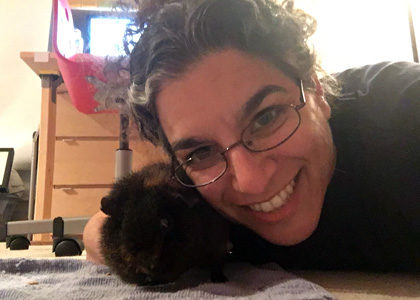
I paid the ChickieNob 25 cents for a “selfie lesson” so I could learn how to take a great image of myself with Truman during tummy time. Truman didn’t really listen to my advice to look into the little dot at the top of the phone. But he did, at least, lean in close.
Still paralyzed, but also still eating and drinking and wheeking for cookies. So no change, but I added another antibiotic yesterday.
July 10, 2016 10 Comments
602nd Friday Blog Roundup
I found Drake’s words on the Alton Sterling shooting incredibly touching: “No one begins their life as a hashtag. Yet the trend of being reduced to one continues.” I want to cling to his hope because it feels like society is drowning right now.
*******
Truman is about the same. He’s eating, but he’s losing weight. He is very frail. His hind legs are still paralyzed, so he’s sort of slithering around on his tummy, pulling himself with his front paws when he moves, which is not very often or very far. He can’t really poop unless I massage his belly. And, at the same time, he is still so Truman-y. He wheeks the moment I come downstairs in the morning, and positions himself to watch my morning yoga.
I was positive last month that he would never bounce back from the head tilt illness; that we would lose him from that. And he managed to pull through. The vet told me to give it until Sunday night. That if it’s an infection, we’ll see improvement by then. So I’m hoping this is just another infection and we’ll see a change in the next few days. Because I cannot contemplate the otherwise.
*******
Stop procrastinating. Go make your backups. Don’t have regrets.
Seriously. Stop what you’re doing for a moment. It will take you fifteen minutes, tops. But you will have peace of mind for days and days. It’s the gift to yourself that keeps on giving.
As always, add any new thoughts to the Friday Backup post and peruse new comments in order to find out about methods, plug-ins, and devices that help you quickly back up your data and accounts.
*******
And now the blogs…
But first, second helpings of the posts that appeared in the open comment thread last week. In order to read the description before clicking over, please return to the open thread:
- “Microblog Mondays: Something to Look Forward to” (My Path to Mommyhood)
- “A Life” (Stirrup Queens) — thank you, Cristy and Jess!
- “3 Things I Learned from the Adoption Process” (Lavender Luz)
Okay, now my choices this week.
My Path to Mommyhood has a post about the commentary people make at certain points in the family building process. The “it’s too soon!” and “are you still trying that” comments. Those types of words are salt in the wound of people who are already profoundly feeling the passing of time. She explains, “When it came time to redo our homestudy, we found ourselves facing several comments, such as, ‘So you’re going to sign on for another year with this agency, huh?’ or ‘What’s causing the delay? Is there something they can tell you about why you’re not getting matched? Shouldn’t you be matched by now?’ or ‘How long are you going to do this?’” It would be so simple for people to switch their words to ones of encouragement (as she points out in the post) vs. harping on the length of time. It’s an important read.
The Road Less Travelled has a post marking 15 years of living childfree after infertility. It’s a wonderful post unpacking her personal journey, but also looking at the greater world of resources out there for those walking the path. It brings to light an important point about whether or not to add your voice to the blogging mix: The answer is “yes.” If not to record your own journey for yourself, then to be there for everyone else who is in a place where they so desperately need to hear a “me, too.”
Anabegins cracked me up with the title of her post but kept me reading because it’s just a really good vent. I love her opening: “Nothing like holidays to cause major FOMO when you weren’t actually invited to any parties, and the fireworks are just too late and too crowded and too loud and were desperately counting down the end of the excess family togetherness but also dreading another looming work day full of annoyances and insurmountable hurdles.” Go over and give her a hug, and maybe add your own rant. It feels good to get it out.
Lastly, Hope Floats Among the Cherry Blossoms has a post about a roll of wrapping paper that served as a trigger for her ex-husband’s infidelity. She so beautifully reflects on where she has been: “My past felt so big and heavy. I didn’t know what to do with it.” It’s a post about the moments that continue to affect us long after they’re over.
The roundup to the Roundup: Drake’s words. Truman update. Your weekly backup nudge. And lots of great posts to read. So what did you find this week? Please use a permalink to the blog post (written between July 1st and July 8th) and not the blog’s main url. Not understanding why I’m asking you what you found this week? Read the original open thread post here.
July 8, 2016 10 Comments
Shark!
Truman is sick again. On Monday night, he stopped using his back legs. His front legs work fine, and he can drag himself forward by those paws. But his right leg is tucked uselessly under his body, and he’s dragging it around like a deflated balloon.
The vet said, as always, bring him in.
He has lost weight again despite eating enormous amounts of food. She took x-rays to rule out a fracture, which leaves us with two possibilities. An infection (the same one or a new one) that is affecting his nervous system. Or cancer.
The twins’ faces crumpled when she said that word — how can your face not crumple when you hear that word? — and we continued the conversation silently through stares and shrugs. What can we do if it’s cancer, I asked aloud. Nothing, she told me with her eyes and a head tilt.
So now we wait. And we give him the antibiotics and an anti-inflammatory drug. It may be an infection or it may be cancer, and we won’t know until we know.
*******
We went down to Hilton Head on holiday. The ocean is fairly calm, and you can walk far out into the water.
We were jumping waves in the sense that we were bobbing up and down every time a gentle wave passed by, and I was hanging off of Josh’s back because the last time I put my foot down in the water, I accidentally stuck it in a crab’s pincer. I rationally know that oceans are not swimming pools and they are homes for animals, but… I don’t like the reminder.
So we’re in the water when a man comes running down the beach and screams, “Massive shark! Get out of the water!”
Fuck the crabs! I race for the shore, screaming at Josh, “Get my daughter out of the water!” (Like that I get all possessive when panicked? She’s suddenly mine and only mine.) When we get to the sand, I turn around to survey the water, expecting to see a huge dorsal fin where we were just bobbing. But nothing is there.
When the man loops back, I stop him to ask about the shark. Massive shark, he told me, came within 10 feet of his child. He was running up the beach to warn people. But where is it? I asked.
Over there, he pointed, many many yards away. We could have swam towards the shore at a normal pace, and it still wouldn’t have reached us.
But isn’t that life? Everything seems dangerous until it’s not dangerous, and simultaneously, everything feels fine until you realize it isn’t fine. It could be a calm day in the ocean or it could be the seconds before a shark attack. It could be an infection or it could be cancer.
You just never know until you know.
July 6, 2016 16 Comments
I Need Sleep Lessons
Sleep is one of those things we expect people to learn on their own, like eating or breathing. We don’t really teach people how to eat, even though they may need lessons to improve their relationship with food, and we don’t really teach people how to breathe, even though yoga studios offer lessons on how to full inflate your lungs.
Sleep falls into that category. We expect babies to know that at some point in their day, they should close their eyes and lose consciousness.
But I am living proof that not everyone naturally gets it.
I am really terrible at falling asleep and staying asleep. I’ve tried all the tips sleep experts offer up, and all of them are sound ideas for people who already know how to fall asleep. But that is my problem — I don’t know how to make myself sleep. It doesn’t naturally happen when I close my eyes. I can keep my eyes closed for hours, thinking about nothing, and I still don’t fall asleep. Nothing is keeping me up, in the same way that nothing is holding me back from fixing my own car except for the fact that I don’t know how to do it.
Sometimes I fall asleep by chance only to wake back up a few hours later. I am just as unknowledgeable at staying asleep as I am at falling asleep. I have never been able to nap unless I’m operating at such a sleep deficit that my body switches to autopilot.
There are a lot of articles on the importance of sleep, and I believe everything they say. There are manifestos about setting aside time for sleep, and posts about limiting screen time before bed, and articles about what to eat for a good night’s sleep.
But zero books that explain how to force your brain to take a few hours off.
Do you fall asleep and stay asleep easily?
July 5, 2016 20 Comments